MCP


Jan Krüger
I am a software architect and a developer who loves to build solid solutions. My journey has taken me from architecting complex ERP systems to founding a startup and now to creating web-based software solutions. I'm always looking for what's next in tech—right now, that's AI.
ERP Systems Architect
Complex business software solutions
(Ex-)Startup Founder
Predictive eyetracking technology & more
Web-Based Software Creator
Modern apps for the browser
AI Explorer
Building and integrating with AI

That's not the MCP I'm here to talk about...
(But both are legendary in their own way!)
The AI Ecosystem: Three Layers
The modern AI ecosystem consists of different layers and interaction patterns
Large Language Models
Core AI models that understand and generate human language and multimodal content
- • GPT4.1, Claude Sonnet 4, Llama 3.2, Gemini 2.5, DeepSeek R1, Kimi K2
- • Text, image, audio, video processing
- • Multimodal generation
- • Tool-calling capabilities
- • API-accessible
Chat Interfaces
User-friendly interfaces for interacting with AI models
- • chatgpt.com, claude.ai, gemini.google.com
- • chat.mistral.ai, kimi.com, qwen.ai, chat.deepseek.com
- • Web-based multimodal UIs
- • Text, image, audio support
- • Direct human-AI conversation
AI Agents
Autonomous systems that can act on behalf of users
- • AutoGen, LangChain, LangGraph, CrewAI
- • smolagents, strands agent
- • Advanced tool-calling & integration
- • Multi-step task execution
- • Goal-oriented behavior
- • the big "loop": Think -> Act -> Update State -> Repeat.
🧠 The Anatomy of an AI Agent
An AI Agent is a software system that uses large language models (LLMs) as its "brain" to autonomously perform complex, multi-step tasks. Unlike simple bots or assistants, an agent is goal-oriented and operates with a high degree of autonomy.
Planning
Breaks complex goals into smaller subtasks using chain-of-thought reasoning.
Tool Utilization
Uses external tools and APIs (e.g., web search, code interpreter) to interact with the real world.
Memory Systems
Combines short-term memory for context and long-term memory (e.g., vector store) to learn and improve.
This combination allows AI agents to move beyond simple content generation and perform complex workflows to achieve a desired outcome. Many agents also support human-in-the-loop workflows, where a person can review, guide, or approve important steps.
Modern Agent Types
Autonomous Agents
Run on their own, follow goals without constant input
Example: A coding agent that plans, writes, and tests a full app after one prompt
Cognitive Agents
Use reasoning, memory, and reflection for better decisions
Example: A research assistant agent that remembers past queries, reflects on failures, and improves its answers
Conversational Agents
Specialize in natural dialogue
Example: A customer-support chatbot that answers FAQs and holds multi-turn conversations
Tool-using Agents
Extend abilities by calling APIs, databases, or code execution
Example: An AI assistant that uses a Python REPL, SQL queries, or web search to solve tasks
Multi-Agent Systems (MAS)
Several agents working together, collaborating or debating
Example: A planner agent creates steps → a coder agent writes code → a reviewer agent checks for errors
The AI Integration Challenge
Current Pain Points in AI System Integration
Isolated AI Systems
AI systems are disconnected from real-world data and live information
Custom Integration Code
Each integration requires bespoke development and maintenance
No Tool Discovery
No standardized way to discover available capabilities
Siloed Tools
Tools can't be shared or reused across different AI systems
Authentication Chaos
Complex, inconsistent authentication for each service
Maintenance Overhead
High cost of maintaining custom integrations and APIs
MCP the (LL)Model Context Protocol
The Model Context Protocol (MCP) enables seamless, secure connections between AI systems and external data or tools, standardizing interactions for improved AI capabilities and integration.
What is MCP #not?
NOT a new AI Model
MCP is not another language model or AI system. It's a protocol for connecting existing AI systems.
NOT a replacement for APIs
MCP doesn't replace existing APIs. It provides a standardized way to discover and use them.
Model Context Protocol (MCP) - Key Advantages
Universal Integration
Connects any AI model to any data source through a standardized protocol, eliminating custom integrations
Secure Access
Provides controlled, permission-based access to sensitive systems and data without exposing credentials
Extensible Architecture
Easy to add new tools, data sources, and capabilities as your needs grow
Developer Efficiency
Reduces integration complexity from weeks to hours with pre-built connectors
Cross-Platform Compatibility
Works across different AI models, applications, and development environments
Real-Time Data Access
Enables AI models to work with live, up-to-date information from databases, APIs, and file systems
Simplified Maintenance
Single protocol to maintain instead of multiple custom connections and APIs
Hype or Hope?
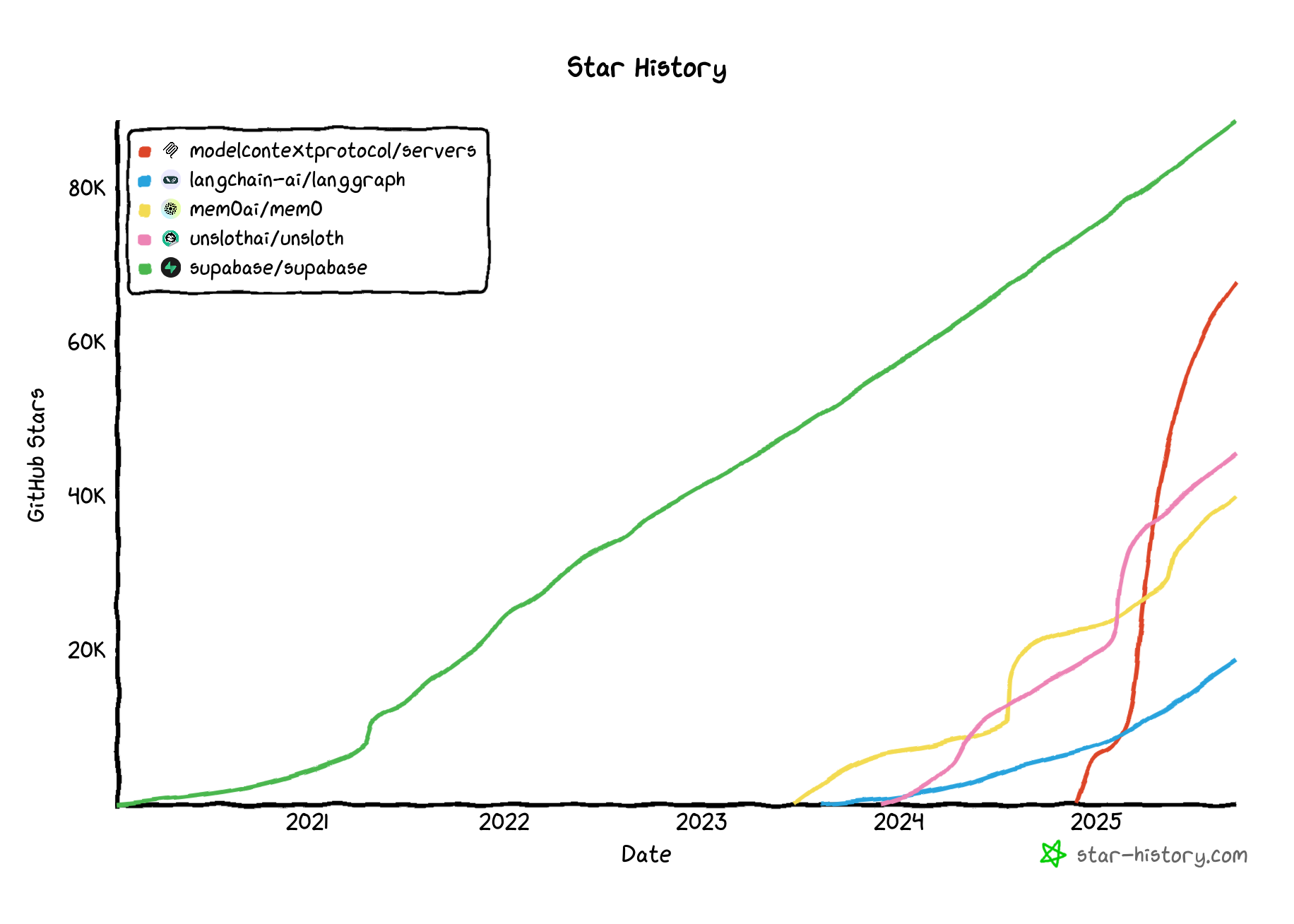
Architecture & Integrations
Client-Server Model
MCP follows a client-server architecture where AI applications communicate with MCP servers via JSON-RPC 2.0
Server Components
Tools
Functions AI models can invoke for data operations
Prompts
Template systems for conversation flows
Resources
Data sources for model context
Classical Tool Calling vs MCP
Classical Tool Calling
(e.g., smolagent, OpenAI, LlamaIndex)
- • Tools are defined in code, often as Python functions
- • Each agent/server must implement its own tool registry
- • No standard for tool discovery or metadata
- • Tight coupling between agent and tool code
- • Harder to share, reuse, or compose tools across systems
MCP Tool Calling
- • Tools are described and discovered via a standard protocol
- • Agents can query MCP servers for available tools and metadata
- • Decouples agent logic from tool implementation
- • Enables tool sharing, composition, and federation
- • Promotes interoperability across AI systems
Tool Definition Example
Weather Forecast Tool
MCP standardizes how applications expose tools to language models. This example shows a weather forecast tool definition in Python.
Uses @mcp.tool decorator for LLM visibility
Clear function signature with typed parameters
Integrates with external APIs for real-time data
@mcp.tool(description="Given a latitude and longitude, this function returns a string describing the weather forecast at the specified location.")
def get_weather_forecast(lat: float, lon: float, api_key: str) -> str:
    """
    Args:
        lat (float): Latitude of the location.
        lon (float): Longitude of the location.
        api_key (str): Your OpenWeatherMap API key.

    Returns:
        str: A string describing the weather forecast.
    """
    base_url = "http://api.openweathermap.org/data/2.5/forecast"
    params = {
        "lat": lat,
        "lon": lon,
        "appid": api_key
    }
    response = requests.get(base_url, params=params)
    response.raise_for_status()
    return response.text
Supported Communication Transports
STDIO
Standard Input/Output
- • Local transport
- • Same-machine operations
- • Command-line tools
HTTP with SSE
Server-Sent Events
- • Remote transport
- • Network communication
- • Web applications
Streamable HTTP
Modern Alternative
- • No constant connection
- • Greater flexibility
- • Efficient streaming
- • OAuth2 support
MCP formally specifies various transport protocols for diverse client-server scenarios
Authentication Mechanisms
Custom Server / No Auth
For specific integrations where authentication is managed externally
Token-based Auth
Using API keys or tokens for secure access to services like GitHub
OAuth 2
Open standard for access delegation, commonly used for Discord
All communication uses JSON-RPC 2.0 protocol for secure, bidirectional connections
mcp.json Examples in the Wild
STDIO Example
{
  "mcpServers": {
    "browsermcp": {
      "command": "npx",
      "args": ["@browsermcp/mcp@latest"]
    },
    "jina-mcp-tools": {
      "command": "npx",
      "args": ["jina-mcp-tools"],
      "env": {
        "JINA_API_KEY": "your_jina_api_key_here"
      }
    }
  }
}
SSE/HTTP Example
{
  "mcpServers": {
    "linear": {
      "command": "npx",
      "args": ["-y", "mcp-remote", "https://mcp.linear.app/sse"]
    },
    "server-name": {
      "url": "http://SERVER-IP:8000/http/"
    }
  }
}
Interactive Communication
MCP SDK, API, Agent & Tools
Showcase Time!
Now I'll show you some example implementations and real-world use cases of MCP in action.
(Live demo & code walkthrough coming up next!)
Learnings from Anthropic Blog Article
Writing Tools for Agents (Kudos Philipp Schmid)
Implement `schedule_event` instead of separate `list_users`, `get_availability`, and `create_event` tools.
Test with goals like "find the project lead and schedule a meeting," not just "get user."
Programmatically run evaluations to track success rates, token counts, and tool call frequency.
Feed failed evaluation transcripts to an LLM to get suggestions for improving your tool's code.
Use prefixes to differentiate tools, such as `jira_search_issues` vs. `github_search_issues`.
Prefer human-readable names like "Jane Doe" instead of cryptic `usr_7a3b4c9` IDs.
Implement pagination and filtering for tools that can return long lists of results.
Instead of `Invalid input`, return `Error: Missing 'user_id'. Example: search(user_id=12345)`.
If output is cut, guide with "Showing 10 of 100 results. Use the 'page' parameter for more."
Use `user_email` or `user_id` instead of a generic `user` parameter.
In parameter descriptions, specify requirements like "Date must be in YYYY-MM-DD format."
Add an `Example: search_query='status:open'` to the parameter's help text.